Warriors Last Dance Documentation by slotgen
Warriors Last Dance
Created: 16/12/2025
Updated: 16/07/2026
By: Slotgen
Email: contact@slotgen.com
Thank you for purchasing my code. If you have any questions that are beyond the scope of this help file, please feel free to email via my user page contact form here. Thanks so much!
Table of Contents
- About the Game
- Feature List
- Package Contents
- Technical Requirements
- Project Structure
- Event Sheets & Game Logic
- Modifying Game Variables
- Change Graphics
- Upload to Your Website
- Construct File (.c3p)
- Export as APK / Other Platforms
- Embed HTML5 Game WordPress Plugin
- Troubleshooting
- Extended License
A) About the Game - top
Warriors Last Dance is an HTML5 slot machine game built with Construct 3. It is a 5-reel, 3-row video slot with 20 fixed paylines, a scatter-triggered free spins feature, cascading (drop) symbols, and Big Win / Mega Win / Super Mega Win celebration sequences. The game runs in any modern browser on desktop and mobile, and the full Construct 3 source project (.c3p) is included so you can reskin, rebalance, and re-export it however you like.
B) Feature List - top
- 5×3 reel grid with 20 fixed paylines — payline patterns are fully data-driven and editable.
- 8 paying symbols with individually configurable payouts for 3, 4, and 5 of a kind.
- Free Spins feature — triggered by scatter symbols, with a pick-your-bonus choice screen and win multipliers.
- Cascade / drop mechanic — winning symbols are removed and new ones drop in, with an increasing drop multiplier.
- Big Win, Mega Win and Super Mega Win celebration animations with coin effects, driven by configurable win/bet thresholds.
- Turbo mode for faster reel spins.
- Auto Spin mode with automatic stop handling.
- Bet controls — adjustable bet level over a configurable base bet.
- Interactive paytable screen showing live payout values.
- Spin history screen with paging and per-spin transaction details (time, bet, win, profit).
- In-game menu with sound toggle and quit option.
- Full audio — background music, free-spin music, reel stops, drops, buttons, scatter and big-win stingers (.webm/opus).
- Mouse and touch controls — playable on PC, mobile, Android and iOS browsers.
- 720×1280 viewport, letterbox scaling — adapts cleanly to any screen size.
- Offline / PWA support — exported with a service worker and app manifest, installable to the home screen.
- Easily reskinnable — replace sprites in the Construct 3 editor without touching logic.
- No server-side code required — a purely static HTML5 export; works on any web host.
C) Package Contents - top
Warriors Last Dance.c3p— the complete, editable Construct 3 source project (all layouts, event sheets, graphics and sounds). Included for all buyers.HTML file/Warriors Last Dance.zip— a ready-to-upload HTML5 export of the game. Unzip and upload to your host, no build step needed.documentation/— this documentation.
D) Technical Requirements - top
To play / host the game (HTML5 export):
- Any web hosting or web server capable of serving static files (Apache, Nginx, IIS, Node, or any shared hosting). No PHP, no database, and no server-side code are required.
- The game must be served over http:// or https:// — it will not run when opened directly from disk via
file://(see Troubleshooting). - HTTPS is required for the offline/PWA features (service worker). The game itself also runs fine over plain HTTP.
- A modern browser with WebGL support: Chrome, Firefox, Edge, Safari (desktop and mobile).
- Server must serve
.webm,.jsonand.ttffiles with correct MIME types (most hosts do this by default; see Troubleshooting if not).
To edit the game (.c3p source):
- Construct 3 (release r466 or newer) — runs in the browser at editor.construct.net. A paid Construct 3 subscription is required to edit and export a project of this size. Get a license here.
- "Better Outline" addon (free) by skymen, version 2.1.0.1 or newer — this third-party effect is used in the project and must be installed in the Construct 3 editor (Menu → View → Addon Manager) before opening the .c3p. Search for “Better Outline” on the Construct addons page.
- All other plugins and behaviors used are official Scirra ones bundled with Construct 3: Array, Audio, Date, Dictionary, Keyboard, Sprite, Text, Tiled Background, Touch, and the Bullet, Flash, Rotate, Sine and Tween behaviors.
To export as a mobile app (optional): a Construct 3 subscription, plus the standard Android (Cordova) / iOS (Cordova) export workflow — see Export as APK.
E) Project Structure - top
Construct 3 project (.c3p):
| Item | Description |
|---|---|
Layouts → main | The game screen. Contains the reel grid, buttons (spin, turbo, auto spin, bet +/−), paytable, history panel, free-spin choice screen and menu. |
Layouts → obs | An off-screen “object bank” layout that holds object instances so they can be created at runtime. |
Event sheets → Main | Core game logic (~180 event blocks) — see section F. |
Event sheets → BigWin | Big/Mega/Super Mega Win detection and celebration sequence (~30 event blocks). |
Event sheets → History | Spin history recording, paging and detail view (~40 event blocks). |
Object types | All sprites, texts and UI objects, organised in folders (BigWin, History). Families are used for symbols, buttons and big-win effects. |
Sounds / Music | All audio as .webm (opus): reel stops 1–5, drop, button, scatter, big-win stingers, background and free-spin music. |
Fonts | Carre-JWja.ttf — the display font used by all text objects. |
HTML5 export (inside HTML file/Warriors Last Dance.zip):
| File / folder | Description |
|---|---|
index.html | Entry point — open this via your web server to run the game. |
data.json | Exported project data (layouts, events, settings). |
style.css | Page styling for the game canvas. |
scripts/ | Engine and loader scripts generated by the Construct 3 exporter: c3runtime.js (the Construct runtime), main.js, c3main.js, dispatchworker.js / jobworker.js (web-worker rendering), supportcheck.js, modernjscheck.js, offlineclient.js, register-sw.js. |
sw.js, offline.json, appmanifest.json | Service worker, offline cache list and web app manifest (PWA/offline support). |
images/, media/, fonts/, icons/ | Sprite sheets, audio/music, font and app icons. |
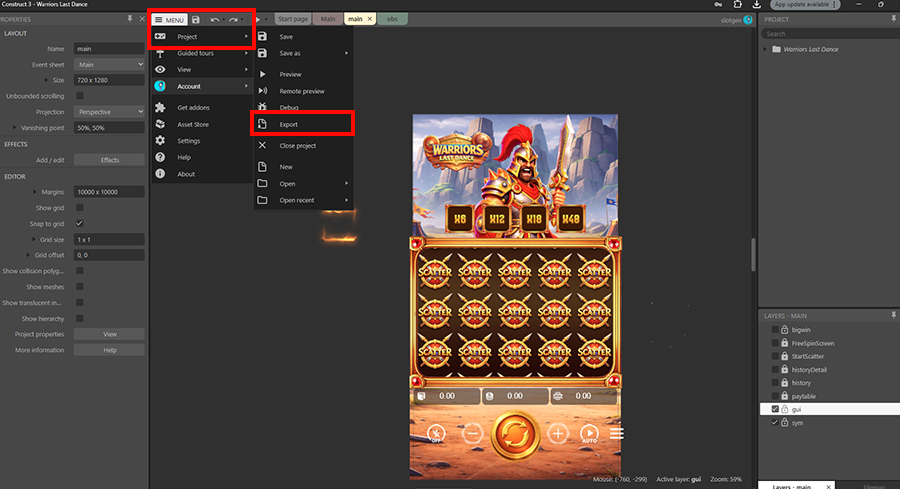
A note on the exported scripts: the files in scripts/ plus sw.js are machine-generated by Construct 3’s official exporter and are not hand-written code — the engine always emits them in compact form. They are not meant to be edited directly. The original, readable source of this game is the included Warriors Last Dance.c3p project: all game logic lives in the visual event sheets, which you open and edit in the Construct 3 editor. To regenerate the files in scripts/, simply re-export the .c3p from Construct 3 (Menu → Project → Export → Web).
F) Event Sheets & Game Logic - top
All game logic is implemented visually in three event sheets. Each sheet is organised into named groups so you can find and modify features quickly:
Main (core gameplay):
- Spin Mechanics — starts the spin, moves the reels, generates symbol outcomes and handles reel stops.
- Resute (Result) — evaluates the 20 paylines against the symbol grid, calculates wins from the payout tables, plays win animations and handles the cascade/drop refills (
DropFill1–5track each reel). - Turbo — toggles fast spin mode (the
Turbovariable scales reel speed). - AutoSpin — loops spins automatically until toggled off or credits run out.
- Bet — increases/decreases
BetLevel, updates the total bet display and deducts the bet frombalance. - Paytable — opens/closes the paytable and fills in live payout values from the payout variables.
- StartScatter — counts scatter symbols, shows the free-spin choice screen and runs the free spins with multipliers (
FreeSpinRemaining,multif,xfre). - Menu — in-game menu, sound on/off and quit.
BigWin:
- CheckBigWin — after each result, compares total win ÷ total bet against the thresholds
PerBW,PerMG,PerSMGto decide whether to show Big Win, Mega Win or Super Mega Win. - BigWin — runs the celebration: darkened background, coin shower, animated counters and the timed transitions between the three win tiers (
timechange).
History:
- History — records every spin (time, transaction id, bet, win, profit) into arrays, renders the paged history list and the per-spin detail view.
There is also a small amount of JavaScript inside events (exported as scripts/project/javaScriptInEvents.js), used for helper calculations; it is readable in the export and editable inside the event sheets.
G) Modifying Game Variables - top
Open the .c3p in Construct 3, open the Main event sheet, and edit the global variables at the top of the sheet (right-click a variable → Edit). The most useful ones:
| Variable | Default | What it does |
|---|---|---|
balance | 1000 | Player’s starting credit. |
BaseBet | 20 | Base bet amount. Total bet = BaseBet × BetLevel. |
BetLevel | 1 | Starting bet level (changed in-game with the +/− buttons). |
PayoutA … PayoutH | e.g. 3|10|50 | Payout table per symbol, formatted 3-of-a-kind|4-of-a-kind|5-of-a-kind. A is the lowest symbol, H the highest (e.g. PayoutH = 50|250|2500). Change these to rebalance the game — the in-game paytable updates automatically. |
lines | 20 patterns | The paylines. Each payline is 5 grid positions (1–15, reading the 5×3 grid) separated by commas; paylines are separated by |. Add or remove patterns to change the number of lines. |
ReelSpeed | 1500 | How fast symbols fall (pixels/second). Higher = faster spins. |
Turbo | 1 | Speed multiplier applied in turbo mode. |
DropMulti | 1 | Starting multiplier for cascade wins. |
distanceV / distanceH | 140 | Vertical/horizontal spacing between symbols — only change if you resize the symbol art. |
xTop, yTop, yBot | 77 / 420 / 980 | Reel grid geometry (left edge, top row Y, bottom row Y). |
In the BigWin event sheet:
| Variable | Default | What it does |
|---|---|---|
PerBW | 20 | Big Win threshold — shown when win ≥ 20× total bet. |
PerMG | 35 | Mega Win threshold (win ≥ 35× bet). |
PerSMG | 50 | Super Mega Win threshold (win ≥ 50× bet). |
timechange | 8,5,6 | Timing (seconds) of the Big → Mega → Super Mega transitions. |
After changing variables, press F5 in the editor to preview, then re-export (Menu → Project → Export → Web) to update your hosted version.
H) Change Graphics - top
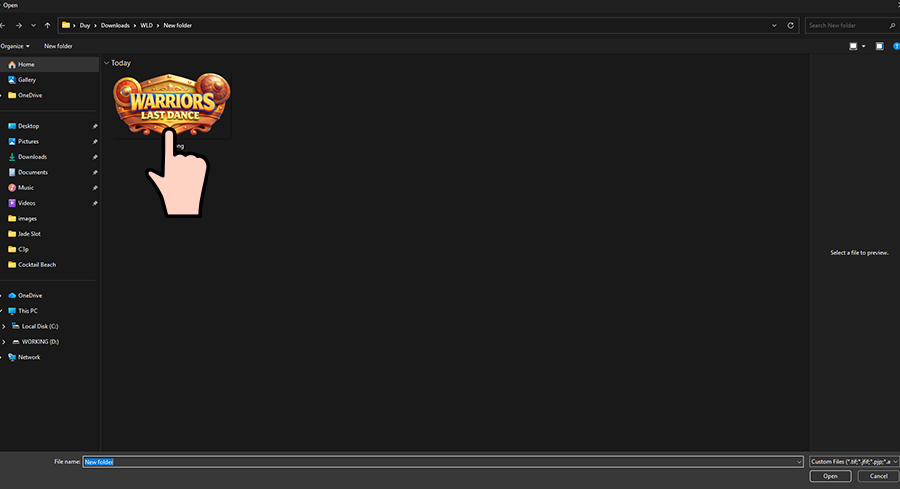
First, you open the .c3p file and determine the object to change the graphics.
Then follow the instructions below:
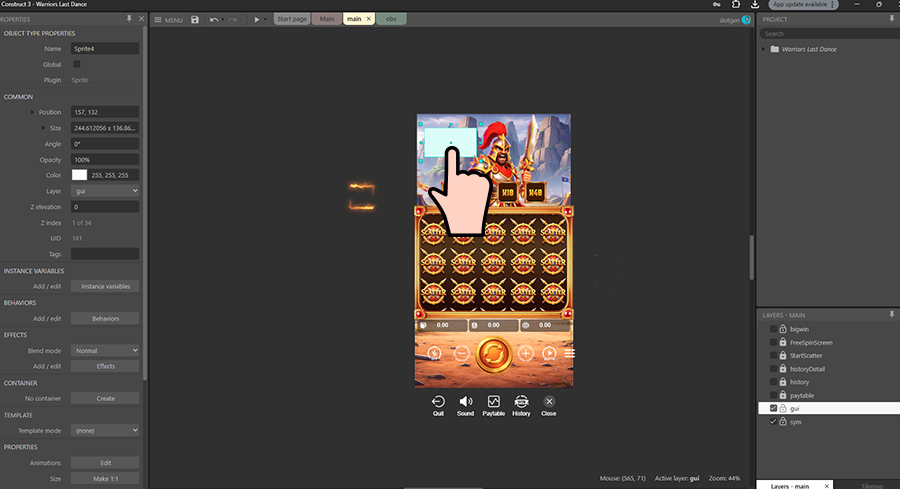
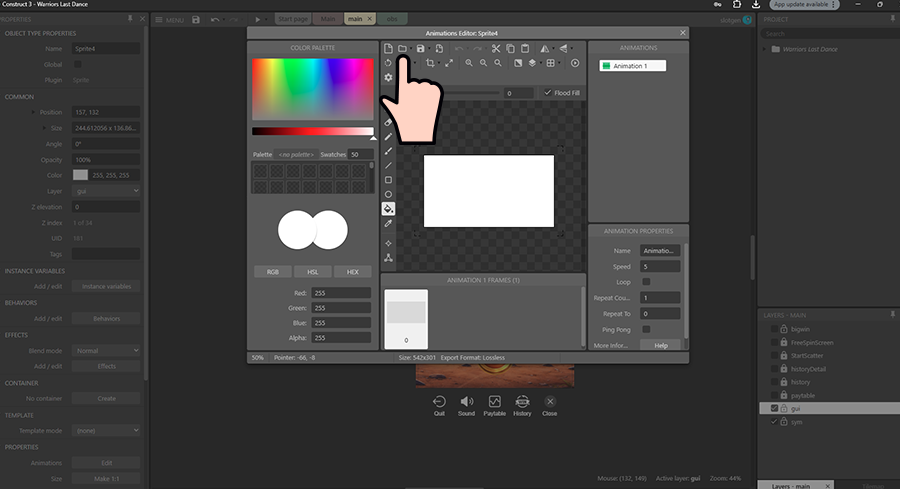
Select the image to replace stored in your folder.
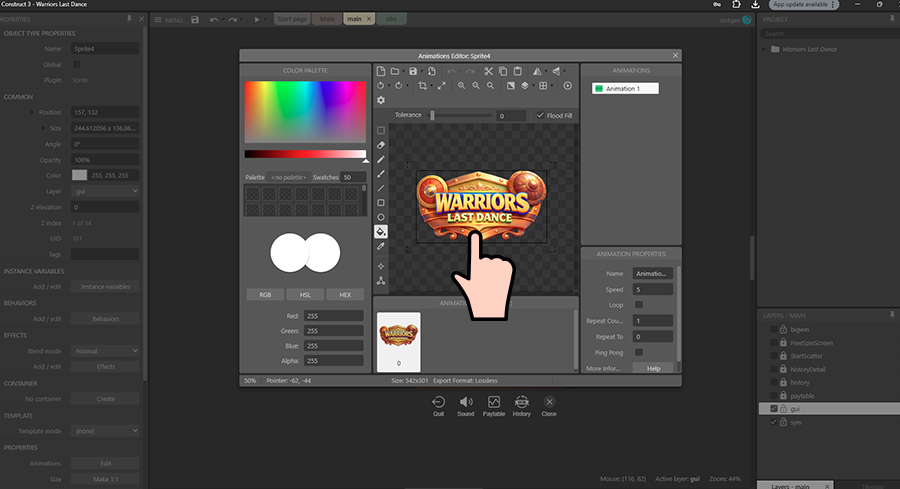
Tip: keep replacement images close to the original dimensions (symbols are spaced 140px apart on a 720×1280 layout). If you change symbol sizes, adjust distanceV, distanceH, xTop, yTop and yBot in section G.
I) Upload to Your Website - top
You need hosting to upload it and share the link with your friend to play.
Some free hosting:
- Hostinger
- Weebly
- 000Webhost
- Wix
- InfinityFree
- Awardspace
- Freehostia
- Freehosting
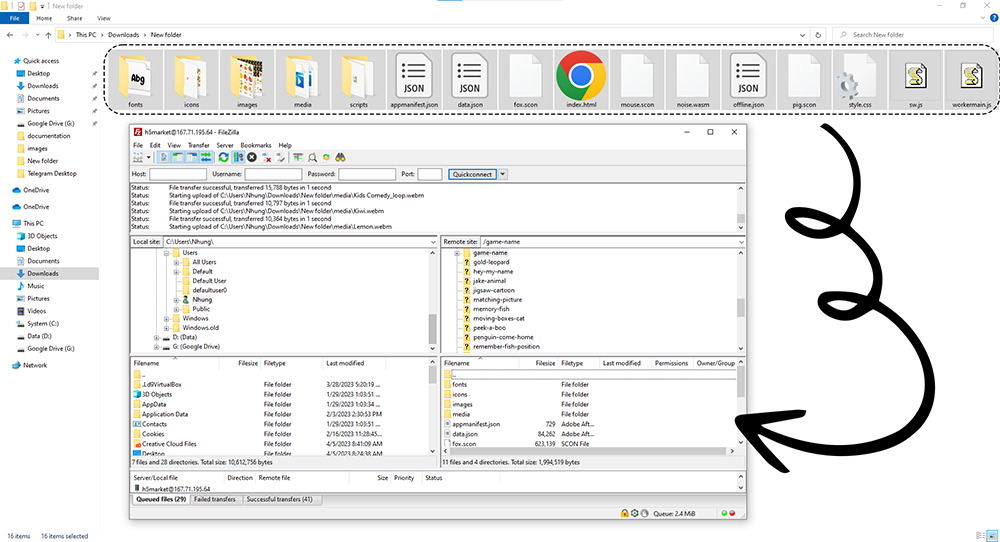
You can unzip HTML file/Warriors Last Dance.zip and upload its contents directly to your website. I would suggest using FileZilla for that.
Login to your FTP account of your domain, create a new folder for the game and move all exported files onto the server in FileZilla.
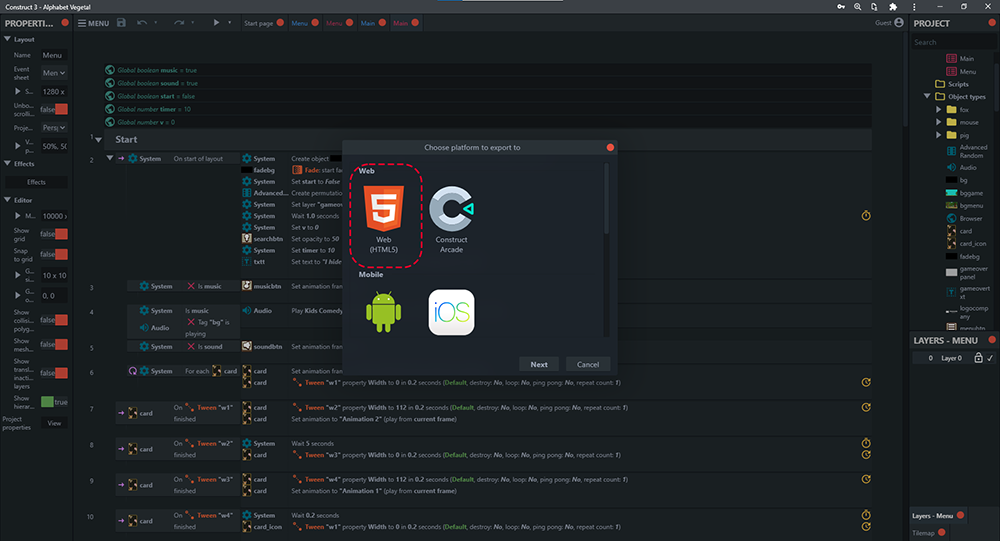
Step 1: (Only if re-exporting yourself) From the Construct 3 window, click on the "Menu" button then select "Export" or press F6. Then select "Web".
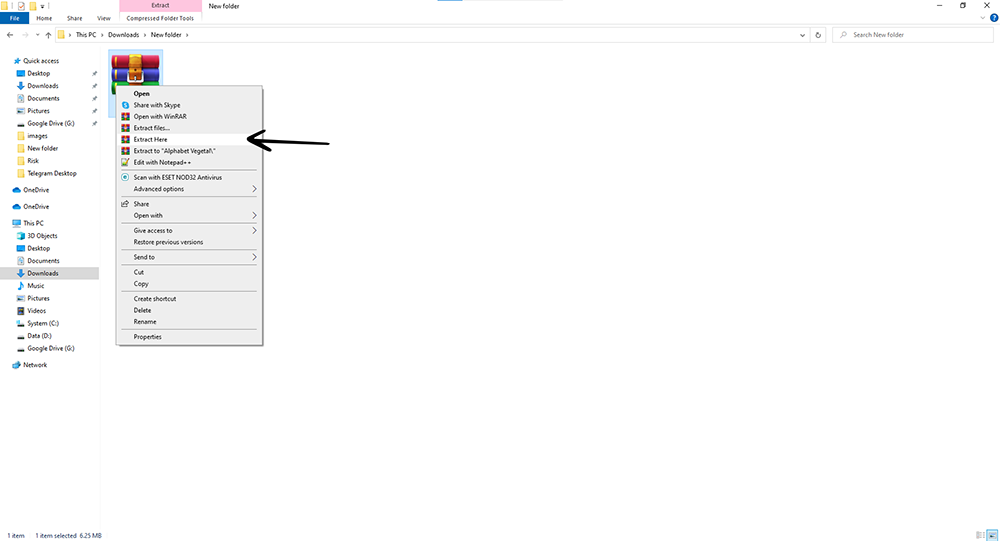
Step 2: After the file has been downloaded, extract it.
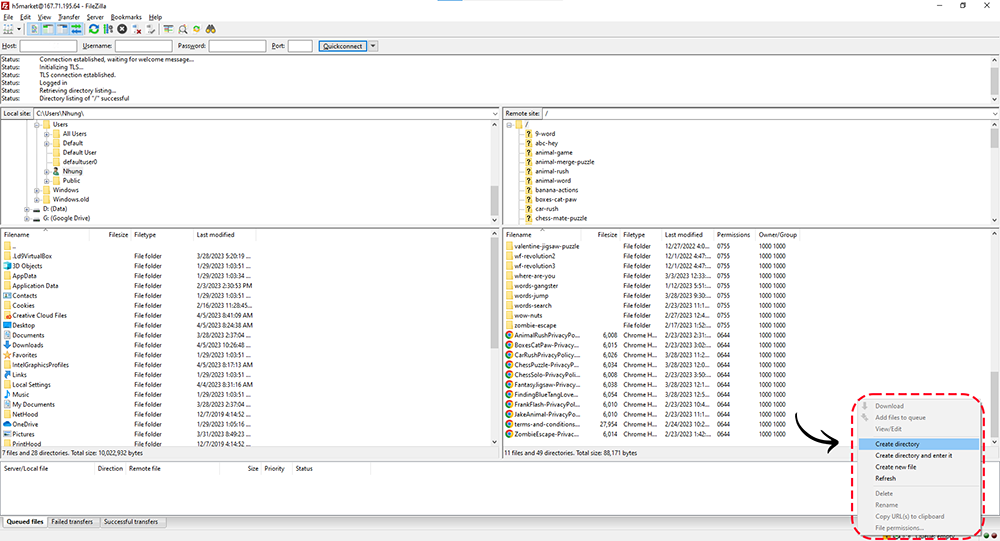
Step 3: Open the FileZilla window and log in. You need to have the following information: Host, Username, Password; in the Port section type 21. Then right click and select Create Directory.
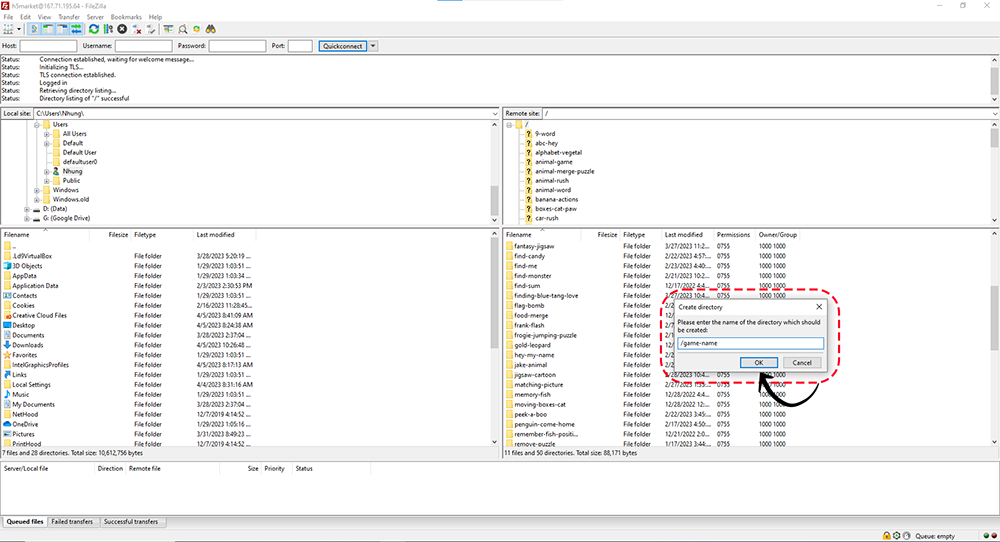
Finally, you proceed to import the previously extracted files. Then go to your server link and add the path "/game-name" after it.
J) Construct File (.c3p) - top
The Construct 3 file (.c3p) contains all sources and game mechanics and is included in this package for all buyers. Open it in the editor at https://editor.construct.net/ (install the free “Better Outline” addon first — see Technical Requirements).
In order to export your game, you are required to get a Construct 3 license. You can get the license here: https://www.construct.net/en/make-games/buy-construct
K) Export as APK / Other Platforms - top
Step 1.
Open the .c3p in the editor.
Step 2.
Go to Menu -> Project -> Export
Step 3.
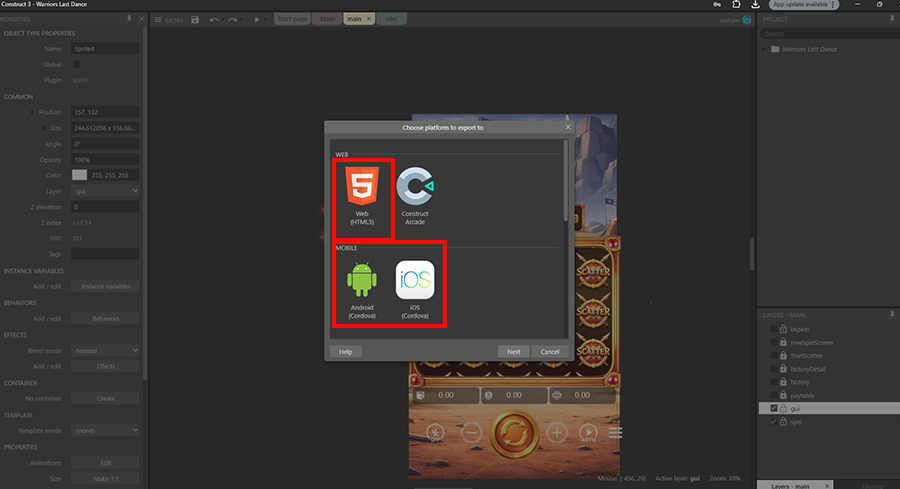
Choose Android (Cordova), iOS (Cordova) or Web (HTML5) according to which platform you want to export to.
L) Embed HTML5 Game WordPress Plugin - top
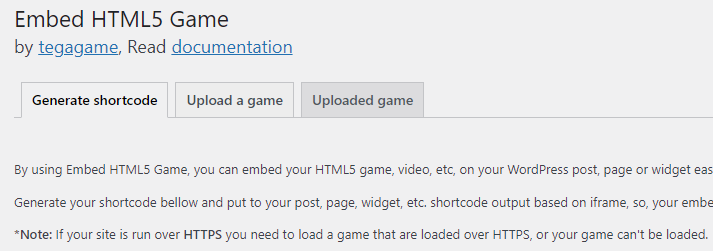
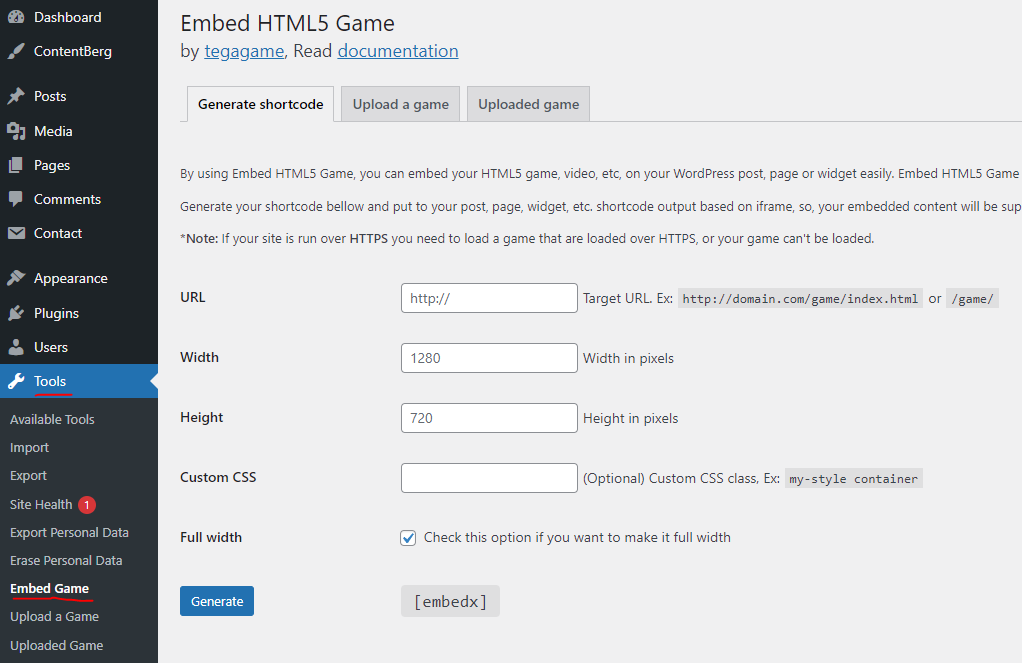
Using the Embed HTML5 Game plugin, you can easily embed your HTML5 game into your WordPress post, page, or widget. Embed HTML5 Game can make your HTML5 game fit on any screen size.
Shortcode output is based on iframe, so your embedded content will be supported on any modern browser.
Installation:
- Download the plugin here or on the post attachment
- Login to your WordPress site, then go to “Dashboard > Plugins > Add new > Upload plugin.”
- Upload “embed-html5-plugin.zip”
- After the plugin is uploaded then, activate it.
Screenshots:
M) Troubleshooting - top
1. Black screen / nothing loads when I double-click index.html.
Construct 3 games cannot run from the file:// protocol — browsers block the game’s data requests for security reasons. Always run the game from a web server. For quick local testing use one of these in the game folder:
# Python
python -m http.server 8000
# then open http://localhost:8000

# Node
npx http-server -p 8000
or use XAMPP/WAMP, or the “Live Server” extension in VS Code.
2. CORS errors in the browser console (“blocked by CORS policy”).
This happens when the game files are loaded from a different origin (domain/port) than the page, or from file://. Fixes: serve all game files from the same domain as the page; if you must host the game files on a CDN or different subdomain, send the header Access-Control-Allow-Origin: https://your-site.com for the game files; when embedding with an iframe, point the iframe directly at the game’s own index.html URL rather than importing scripts across domains.
3. Audio or fonts don’t load (404 or MIME-type errors).
Some servers don’t know the correct MIME types. For Apache, add this to your .htaccess:
AddType video/webm .webm
AddType application/json .json
AddType font/ttf .ttf
For Nginx, add the equivalent entries to your mime.types. For IIS, add the MIME mappings in the site settings.
4. No sound until I tap/click.
This is normal: mobile and desktop browsers block autoplaying audio. Sound starts after the first user interaction — this is a browser policy, not a bug.
5. I replaced files on my server but the old version still shows.
The service worker (sw.js) caches the game for offline play. After updating files, do a hard refresh (Ctrl+F5), or clear site data in the browser (DevTools → Application → Clear storage). When re-exporting from Construct 3, the export gets a new version automatically and updates on the second load.
6. Offline / “install app” features don’t work.
Service workers require HTTPS (or localhost). Make sure your site has a valid SSL certificate and that sw.js is served from the game’s own folder.
7. Construct 3 says an addon is missing when opening the .c3p.
Install the free Better Outline addon by skymen (see Technical Requirements), then re-open the project. Also make sure you are on Construct 3 r466 or newer.
8. The game looks stretched or has black bars.
The project uses letterbox scale at 720×1280. Black bars on very different aspect ratios are expected; to change this behaviour, open the .c3p and change “Fullscreen mode” in Project Properties.
N) Extended License - top
If you bought the Extended License I will reskin the game (use your graphics, create a new logo) for free.
Once again, thank you so much for purchasing this code. As I said at the beginning, I'd be glad to help you if you have any questions relating to this code. No guarantees, but I'll do my best to assist. If you have a more general question relating to the code on Codecanyon, you might consider visiting the forums and asking your question in the "Item Discussion" section.
Slotgen